

Looking for the best AI receptionist or answering service for your plumbing business? This guide compares the top AI receptionist software and answering services for plumbers, with real costs, ROI calculations, and how to choose the right platform for your company.
What Is an AI Receptionist for Plumbers?
An AI receptionist (also called an AI answering service or virtual receptionist) is software that answers your plumbing business phone calls using conversational artificial intelligence. Unlike traditional answering services that only take messages, AI receptionists:
- Answer instantly:No hold time, no voicemail
- Qualify callers:Gather address, problem type, urgency level
- Book appointments:Check your calendar and schedule jobs in real-time
- Handle emergencies:Recognize urgent keywords and dispatch immediately
- Work 24/7/365:Never sick, never on break, never sleeps
When a customer calls at 2 AM with a burst pipe, the AI answers immediately, recognizes the emergency, and either dispatches your on-call tech or books them for first thing in the morning.
How AI Receptionist Technology Works
Modern AI receptionists use natural language processing (NLP) to understand what callers say, even with accents, background noise, or rambling explanations. The technology has improved dramatically since 2022-2023, and today's systems are nearly indistinguishable from human receptionists for standard service calls.
The conversation flow:
- Customer calls your business number
- AI answers instantly (typically under 1 second)
- AI greets caller and asks qualifying questions
- AI determines urgency: Emergency vs. routine
- For emergencies: AI dispatches on-call tech immediately
- For routine calls: AI checks calendar and books appointment
- Customer receives text confirmation
- You receive notification with call details and transcript
Why Plumbers Need 24/7 AI Phone Answering
Plumbing has unique characteristics that make 24/7 phone answering critical:
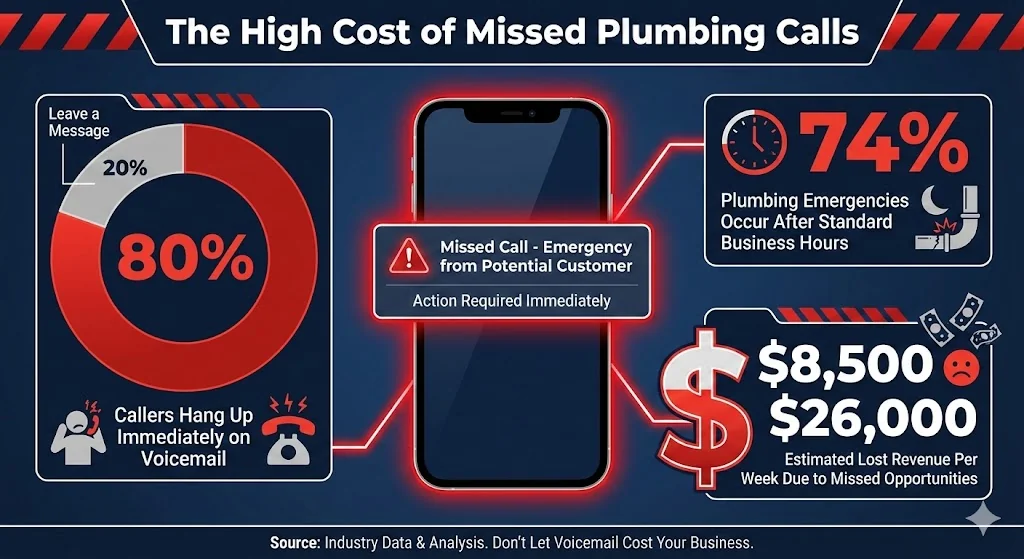
74%
of plumbing emergencies happen after hours
Burst pipes, sewage backups, and water heater failures don't wait for business hours. If your after-hours calls go to voicemail, you're losing the majority of your highest-value work.
80% of Callers Won't Leave a Voicemail
When someone has water flooding their basement, they're not leaving a message and hoping you call back. Research confirms 80-85% of callers who reach voicemail simply hang up and call the next plumber on Google. Each of those hang-ups represents $400-1,500 in lost revenue.
The First Plumber to Answer Wins
In emergencies, customers call plumbers rapid-fire until someone picks up. The first company to answer captures the job. If your competitor answers at 11 PM and you call back at 7 AM, you've already lost.
You Can't Answer While Working
Plumbers spend their days under sinks, in crawl spaces, and running equipment. Stopping mid-job to answer calls isn't just inconvenient, it's often impossible. Meanwhile, customers calling for quotes or service are met with voicemail.
The Math on Missed Calls
| Metric | Value |
|---|---|
| Total inbound calls/week | 80-120 |
| Missed calls (industry average) | 27% |
| Calls to voicemail that hang up | 80% |
| Lost opportunities | 17-26 per week |
Revenue Impact
- • Average emergency call value: $600-1,200
- • Average service call value: $350-500
- • Lost revenue per week: $8,500-26,000
- • Lost revenue per year: $442,000-1,352,000
Even capturing 20-30% of those lost calls pays for AI receptionist service 50x over.
Calculate your real cost of missed calls →
Key Features to Look For
Not all AI receptionists work equally well for plumbing businesses. Here's what matters:
1. Emergency Recognition and Dispatch
Critical for plumbers. The AI must recognize emergency keywords:
- "Burst pipe" / "pipe burst" / "broken pipe"
- "Flooding" / "water everywhere"
- "Sewage" / "sewage backup" / "sewer smell"
- "No hot water" (in winter = emergency)
- "Gas smell" / "gas leak"
- "Water heater leaking"
When detected, the AI should skip routine questions, immediately gather address, transfer to on-call tech's cell, send text alert with caller info, and provide customer with ETA or next steps.
2. True 24/7/365 Availability
Verify the service has no "maintenance windows" or reduced hours. Plumbing emergencies happen at 3 AM on Christmas. Your AI should answer identically at any time.
3. Natural, Human-Like Conversation
Listen to demo calls before committing. The AI should handle interruptions naturally, understand context and follow-up, not sound robotic or scripted, and respond appropriately to emotion/urgency.
4. Plumbing-Specific Knowledge
Generic AI doesn't understand the difference between hydro jetting and snaking. Look for AI pre-trained on plumbing terminology, customizable knowledge base, ability to answer service-specific questions.
5. Calendar/CRM Integration
The AI should connect to your existing tools: Google Calendar, ServiceTitan, Housecall Pro, Jobber, FieldEdge. This enables real-time booking without phone tag.
6. Customizable Scripts and Greetings
You should control:
- How AI introduces your business
- Questions asked during intake
- Pricing information shared
- Service area verification
- Emergency protocols
7. Spam and Robocall Filtering
Plumbing businesses get bombarded with lead sellers and telemarketers. Good AI systems block:
- Toll-free numbers (often telemarketers)
- Known spam patterns
- Lead generation services
- Extended warranty scams
8. Bilingual Support
In many markets, Spanish-language support significantly expands your customer base. AI should seamlessly switch languages mid-call when needed.
9. Call Recordings and Transcripts
After each call, you should receive:
- Full transcript
- Audio recording
- Caller information
- Action taken (booked, transferred, message)
- Urgency classification
Top AI Receptionist Solutions for Plumbers (2026)
Solution Comparison Table
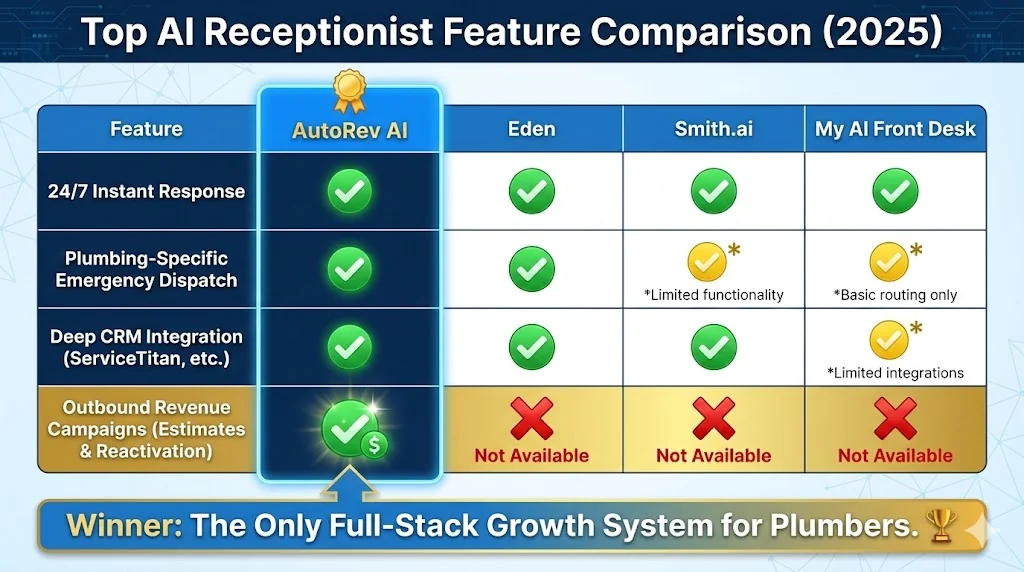
| Feature | AutoRev | Eden | Smith.ai | Whippy | My AI Front Desk |
|---|---|---|---|---|---|
| 24/7 Coverage | |||||
| Plumbing-Specific Training | Generic | Generic | |||
| Emergency Dispatch | Limited | ||||
| ServiceTitan Integration | |||||
| Housecall Pro Integration | |||||
| Outbound Campaigns | |||||
| Estimate Follow-Up | |||||
| Database Reactivation | |||||
| Spanish Support | |||||
| Starting Price | $129/mo | $40/mo | $255/mo | Custom | $65/mo |
| Pricing Model | Calls included | Per minute | Per call | Custom | Per minute |
AutoRev AI (Full-Stack Automation)
Best for: Plumbing companies wanting complete automation beyond just answering calls.
AutoRev isn't just an AI receptionist. It's a full growth system for contractors. Beyond 24/7 call answering, AutoRev includes:
- Inbound AI receptionist with plumbing-specific training
- Outbound campaigns for database reactivation and estimate follow-up
- Cross-sell automation to increase revenue per customer
- Membership enrollment for maintenance agreements
- Full CRM integration with ServiceTitan, Housecall Pro, Jobber
AutoRev Pricing
AutoRev starts at starting at $129/month (plans at autorev.ai/pricing). Calls are included in every plan, and most customers never exceed their included minutes.
Why AutoRev costs more (and why it's worth it)
Most AI receptionists only answer calls. AutoRev also MAKES calls:
- Estimate follow-up:AI calls customers who got quotes but didn't book. Moves close rate from 25% to 40%+. See estimate follow-up sequence →
- Database reactivation:AI reaches out to past customers for tune-ups and seasonal service. Typical response: 8-15% book. Learn how to reactivate customers →
- Cross-sell campaigns:AI contacts plumbing customers about water heater flushes, drain cleaning, etc.
Example
A plumbing company with 1,000 past customers. AutoRev calls them before winter: "Hi, this is [Company]. We serviced your water heater 2 years ago. Want to schedule a flush before the cold hits?" Result: 80-150 jobs from one campaign.
Eden, Smith.ai, and My AI Front Desk can't do this. That outbound capability typically generates 3-5x more revenue than answering alone. That's why the ROI works despite the higher price point.
ServiceTitan Integration (Eden doesn't have this)
AutoRev connects directly to ServiceTitan. Customer history gets pulled during calls, jobs are created automatically, and dispatch can be triggered from AI. Also integrates with Housecall Pro, Jobber, and FieldEdge.
Eden AI
Best for: Smaller plumbing companies focused primarily on after-hours answering.
Pricing: $40/month for 200 minutes, $0.20/minute overage
Limitation: No outbound capability, limited CRM integrations, per-minute pricing can get expensive at volume.
Smith.ai
Best for: Plumbers who want hybrid AI + human option.
Smith.ai combines AI with human receptionists who can handle complex situations:
- AI handles routine calls
- Human backup for complex conversations
- Strong CRM integrations
- Good for high-complexity intake
Pricing: $255/month for 30 calls, additional calls $8-12 each
Limitation: Expensive at scale, not plumbing-specific, limited emergency dispatch.
Whippy AI
Best for: Multi-location plumbing companies needing enterprise features.
Whippy offers comprehensive communication platform:
- AI + live receptionist hybrid
- Campaign automation
- Team inbox
- VoIP integration
Pricing: Custom (typically $500+/month)
Limitation: Overkill for smaller shops, complex setup, not trade-specific.
My AI Front Desk
Best for: Budget-conscious solo plumbers.
Basic AI receptionist at low price point:
- 24/7 answering
- Appointment booking
- Call summaries
- Simple setup
Pricing: $65/month + per-minute charges
Limitation: Basic features, limited customization, no outbound.
See full HVAC answering service vs AI comparison →
AI Receptionist vs Answering Service vs Voicemail
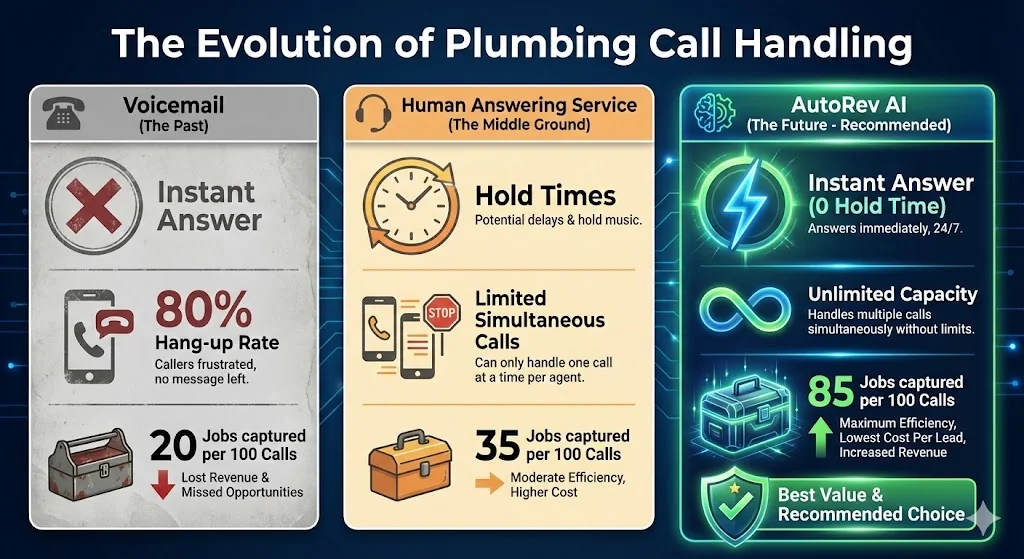
| Factor | Voicemail | Answering Service | AI Receptionist |
|---|---|---|---|
| Cost | Free | $200-600/mo | $200-600/mo |
| 24/7 Coverage | |||
| Instant Answer | Hold time | ||
| Books Appointments | |||
| Emergency Dispatch | Messages only | ||
| Simultaneous Calls | Limited | Unlimited | |
| Plumbing Knowledge | |||
| Caller Hangs Up Rate | 80% | 20% | 5% |
| Jobs From 100 Calls | 20 | 35 | 85 |
The Math: What Each Option Captures
Scenario: 100 after-hours calls per month
Voicemail
- 80 hang up without message
- 20 leave voicemail
- You reach 8 on callback (40%)
- 6 book (75% of reached)
- Revenue: 6 jobs × $400 = $2,400
Answering Service
- 95 answered (some hold abandonment)
- 95 messages taken
- You reach 38 on callback (40%)
- 28 book (75% of reached)
- Revenue: 28 jobs × $400 = $11,200
AI Receptionist
- 100 answered instantly
- 85 book directly (no callback needed)
- Revenue: 85 jobs × $400 = $34,000
3x
more than answering service
AI captures 3x more than answering service, 14x more than voicemail.
Pricing Comparison
Monthly Cost by Provider
| Provider | Base Cost | Per-Call After Included | 300 Calls/Month |
|---|---|---|---|
| AutoRev | $129 | Calls included | $129 |
| Eden | $40 | $0.20/min (~$0.50/call) | ~$190 |
| Smith.ai | $255 | $8-12/call | ~$2,700+ |
| Whippy | Custom | Custom | ~$800+ |
| My AI Front Desk | $65 | $0.15/min (~$0.38/call) | ~$180 |
Note
Eden and My AI Front Desk look cheaper on paper, but they don't include outbound campaigns. AutoRev's estimate follow-up and database reactivation typically generate $3,000-10,000+/month in additional revenue that per-minute services can't capture.
Hidden Costs to Watch
- Per-minute overages:Eden and My AI Front Desk charge per minute. A busy month can double your bill.
- Integration fees:Some charge extra for CRM connections
- Outbound calls:Usually separate pricing (AutoRev includes outbound)
- Multiple lines:Some charge per phone number
The real hidden cost
Cheap services that only answer calls leave money on the table. Every estimate that doesn't get followed up, every past customer who doesn't get reactivated. That's the hidden cost of budget AI.
Recommendation by Business Size
| Business Size | Best Option | Monthly Cost | Why |
|---|---|---|---|
| Solo plumber (budget) | Eden or My AI Front Desk | $65-150/mo | Low cost, basic answering |
| Growth-focused (solo to multi-location) | AutoRev | starting at $129/month | Outbound pays for itself |
The real question: Do you just want calls answered, or do you want revenue generated?
If you only need after-hours answering and don't care about outbound, Eden at $40/mo + minutes is fine. But if you're leaving estimates on the table and have a customer database collecting dust, AutoRev's outbound typically generates 10-20x its cost in recovered revenue.
ROI Calculator: What Missed Calls Cost You
Calculate Your Lost Revenue
Step 1: Count your missed calls
Check your phone system or voicemail. Average by company size:
- Solo: 20-35/week
- 2-5 techs: 30-50/week
- 5-15 techs: 50-100/week
Step 2: Apply the loss rate
- 80% of voicemails = hang up (lost forever)
- Of callbacks attempted, 60% don't answer
- Of callbacks connected, 30% already hired someone else
- Realistic capture rate from missed calls: 15-25%
Step 3: Calculate revenue impact
| Missed Calls/Week | Lost Jobs/Week | Avg Ticket | Lost/Week | Lost/Year |
|---|---|---|---|---|
| 20 | 15-17 | $400 | $6,000-6,800 | $312,000-353,600 |
| 35 | 26-30 | $400 | $10,400-12,000 | $540,800-624,000 |
| 50 | 38-43 | $400 | $15,200-17,200 | $790,400-894,400 |
ROI Example
Plumbing company with 35 missed calls/week
- Without AI: Capturing ~9 jobs from callbacks
- With AI: Capturing ~30 jobs
- Additional jobs/week: 21
- Additional revenue/week: $8,400
- Additional revenue/month: $36,400
- AutoRev cost: $129/month
- Net gain: $36,271/month
- ROI: 281x
Calculate Your Exact Missed Call Cost
Get a custom ROI analysis based on your actual call volume and job values.
How to Set Up an AI Receptionist (Step-by-Step)
Day 1-2: Initial Setup
- Choose your provider:Based on your size, budget, and feature needs
- Sign up and provide business info:Name, address, service area, phone number
- Connect your calendar:Google Calendar, ServiceTitan, Housecall Pro, or Jobber
- Import your services:Most AI can scan your website and auto-populate
Day 3-4: Customize Scripts
- Write your greeting:"Thanks for calling [Company Name], your 24/7 emergency plumber..."
- Define emergency keywords:Burst pipe, flooding, sewage, gas smell
- Set emergency protocol:Transfer to on-call tech, send text alert, provide ETA
- Add FAQ responses:Pricing ranges, service area, payment options
- Configure after-hours handling:Emergency dispatch vs. book for morning
Day 5: Testing
- Make test calls:Call at different times, try different scenarios
- Test emergency detection:Say "burst pipe" and verify proper routing
- Test booking flow:Schedule an appointment, verify it appears in calendar
- Review transcripts:Check accuracy and conversation quality
Day 6-7: Go Live
- Set up call forwarding:Forward your business number to AI number
- Start with conditional forwarding:Only forward when unavailable (safer test)
- Monitor for first week:Review all calls, adjust scripts as needed
- Expand to full forwarding:Once confident, forward all calls
Ongoing Optimization
- Review call transcripts weekly
- Identify questions AI couldn't answer
- Update FAQ and knowledge base
- Track conversion rates
- Adjust emergency keywords as needed
Integration Guide: ServiceTitan, Housecall Pro, Jobber
ServiceTitan Integration
What it enables: AI pulls customer history during calls, appointments book directly into ServiceTitan, job notes and call transcripts sync automatically, tech dispatch triggered from AI.
Setup: Generate API key in ServiceTitan settings → Enter credentials in AI receptionist dashboard → Map fields → Test with dummy booking → Verify two-way sync
Housecall Pro Integration
What it enables: Real-time calendar sync, customer lookup during calls, automated job creation, estimate request capture.
Setup: Connect via Housecall Pro's integration marketplace → Authorize access → Select sync options → Test booking flow
Jobber Integration
What it enables: Schedule jobs directly, access customer database, create quotes from call data, sync call records.
Setup: Connect via Jobber API or Zapier → Map data fields → Configure automation triggers → Test end-to-end flow
Google Calendar (Fallback)
If your CRM doesn't integrate directly, Google Calendar works as universal fallback:
- Share calendar with AI service
- AI checks availability in real-time
- AI creates events with job details
- You receive calendar notifications
Frequently Asked Questions
Ready to Capture More Plumbing Calls?
Every missed call is a customer going to your competitor. With AI receptionist technology, you can answer every call instantly, book appointments automatically, dispatch emergencies immediately, and reactivate past customers.
AutoRev starts at starting at $129/month (plans at autorev.ai/pricing).
