
16 HVAC Call Scripts That Book the Job
A complete HVAC call script opens with empathy, checks for a safety trigger like gas or carbon monoxide before anything else, qualifies the system and the symptom in the caller's own words, captures the address and a callback number, sets a real price range, offers two specific appointment windows, and closes with a text confirmation. Below are 16 scripts for the calls that come in every day, from a routine tune-up booking to the 2 a.m. no-heat call nobody wants to take.
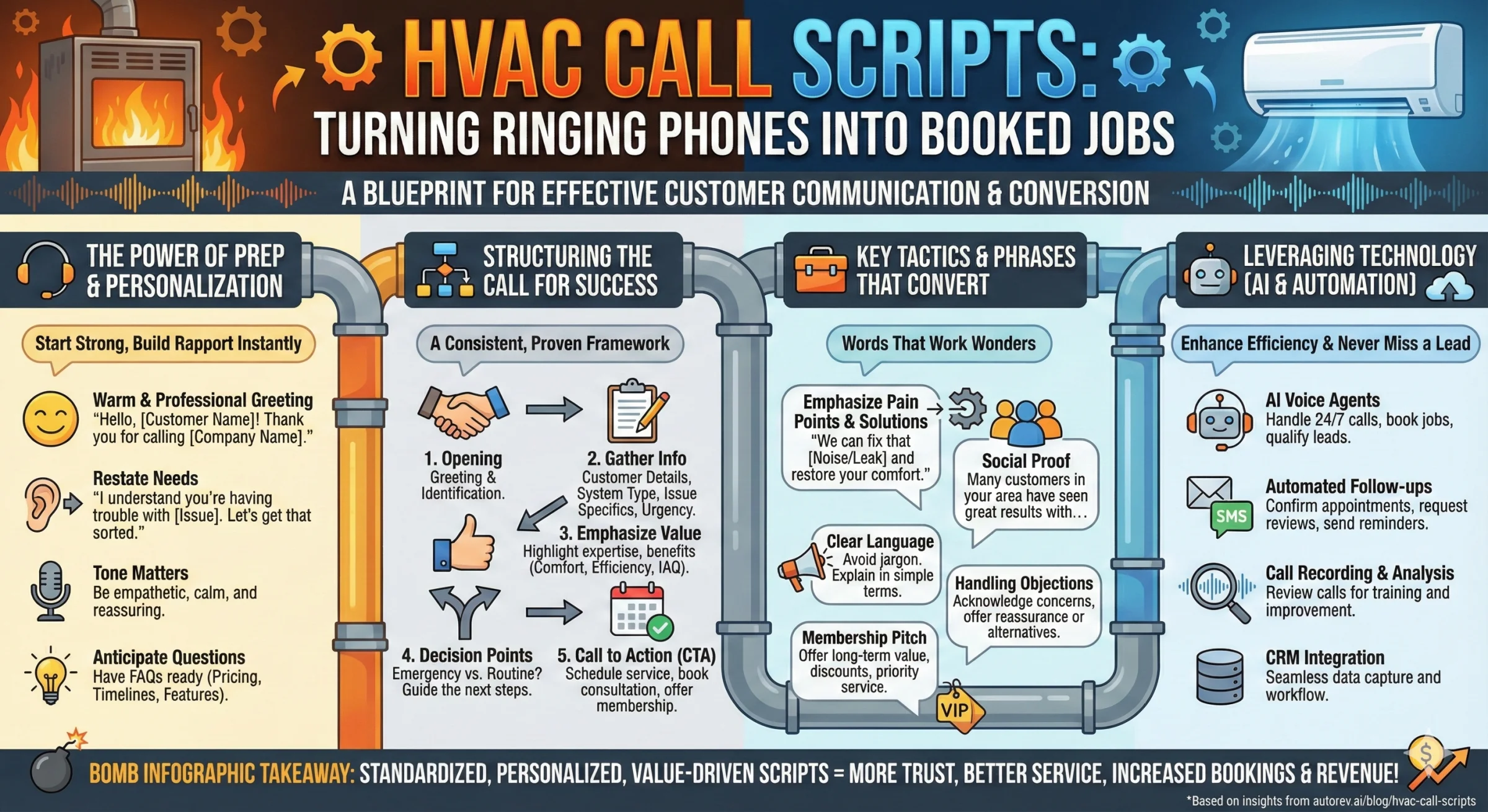
An HVAC call script is a fixed order for handling an inbound call: screen for gas or carbon monoxide first, capture six intake fields, then book. The order matters more than the wording. A CSR who takes the address before asking whether anyone smells gas has already run the call wrong, however well the rest of it reads.
Below are 16 scripts covering emergency triage, routine booking, dispatch, memberships, price shoppers, second opinions and after-hours routing. Every one is written to be read out loud, not studied first. Print the ones your team handles most, or hand the whole page to whoever configures your phone system, AI or human. The safety script comes before the routine ones on purpose. It is the call where a script matters most and the one most CSR training skips entirely.
The Intake Fields Every HVAC Call Must Capture
Before any script branches into emergency, sales, or routine booking, every call needs the same handful of facts. Skip one and the tech either shows up guessing or the office has to call the customer back, which is its own way to lose the job.
| Field | Why the tech needs it |
|---|---|
| Name and a callback number | For the confirmation text and for the number that answers if the tech runs early or late |
| Service address with ZIP code | Confirms the property sits inside your coverage area and routes the visit correctly |
| What the system is doing, in the caller's own words | The raw symptom is more useful than a guessed diagnosis; let them describe it before you interpret it |
| Indoor temperature right now, for no-heat or no-cool calls | The fastest single signal for how urgent this is |
| Equipment type, age, and last service date, if known | Lets the tech pull likely parts before the truck rolls instead of driving back for them |
| Anyone in the home who is very young, elderly, or medically vulnerable | This one fact alone can change whether a call waits until tomorrow or gets a tech tonight |
| Access notes: gate code, pets, parking | Saves the tech real minutes on every single visit, which adds up across a full day |
| Who owns the decision (owner vs. renter, who pays) | Avoids a wasted trip when the person who answers can't authorize the repair |
Emergency Triage: What Escalates Today, What Can Wait
Not every "no heat" call is the same call. A house at 68 degrees with nobody vulnerable at home is a different job than a house at 52 degrees with an infant in it. Train your team, or your AI, against a table like this instead of a gut feeling that changes CSR to CSR.
| Caller says | Escalation level | Why |
|---|---|---|
| Gas smell, CO alarm, smoke, or sparks | Evacuate now, no diagnostic questions | This is a safety event, not a scheduling call |
| No heat, indoor temp under roughly 60°F, or a vulnerable resident | Same-day emergency, live transfer if available | Cold homes turn into a medical risk faster than people expect |
| No cooling, indoor temp over roughly 85°F, or a vulnerable resident | Same-day emergency, live transfer if available | Heat stress risk rises fast for infants and older adults |
| No heat or cooling, moderate indoor temp, nobody vulnerable | Next available slot, same or next day | Uncomfortable, not dangerous; still book it fast, don't stall |
| System runs but underperforms: short cycling, odd noise, rising bills | Book within the week | Real problem worth catching early, not an emergency |
| Tune-up, membership renewal, warranty question, new install quote | Book at the caller's convenience | No urgency driver; this is where you sell the timing that works for them |
Gas Smell or Carbon Monoxide: Script 1
This is the most important call an HVAC CSR ever takes, and most call centers still route it through the same intake as a routine repair. It should never be scripted like one. The moment a caller mentions gas, a burning smell, sparks, or a carbon monoxide alarm, the normal qualifying questions stop. Gas utilities and fire departments publish the same core instruction: get out first, ask questions later. Don't try to diagnose it over the phone, and don't keep the caller on the line inside the house while you gather details.
Caller: "I smell gas in my kitchen" or "My carbon monoxide alarm is going off."
You: "I need you to leave your house right now, and take everyone and any pets with you. Don't stop to open windows, don't flip any light switches, and don't use your phone again until you're outside."
Caller: [May ask questions or hesitate]
You: "Please go now, I'll stay on the line as long as I can. Once you're outside and safe, call 911 and then call your gas utility."
Caller: [Confirms they are leaving or have left]
You: "Good. Do not go back inside until the fire department or the gas company tells you it's safe. Once they've cleared the home, call us back and we'll get a technician out to inspect the system properly. Do you have a safe place to wait?"
What not to do on this call
- Don't ask what the thermostat says, how old the furnace is, or any other diagnostic question before they're out
- Don't offer to "send someone out to check" as the first response; the house needs to be empty first
- Don't quote a price or a dispatch fee on this call at all
- Don't let the caller talk themselves out of leaving because "it's probably nothing"
Once the home has been cleared by the fire department or the utility, that's when you switch back into a normal inbound script and book the inspection. Train every CSR on this exact sequence, and if you're running an AI receptionist, confirm it's configured to recognize these trigger phrases and skip straight to evacuation instead of continuing a qualifying flow it wasn't built to stop.
Inbound Service Call Scripts
Script 2: Standard Inbound Service Call
Caller: "Hi, my AC isn't cooling."
You: "I'm sorry to hear that, let's get you some help. Is the system running but not cooling, or is it not turning on at all?"
Caller: [Describes the problem]
You: "Got it. That could be a refrigerant, compressor, or capacitor issue. We'll need a tech out to diagnose it properly. What's your address?"
Caller: [Gives address]
You: "You're in our service area. I have openings tomorrow between 9 and 11 a.m., or Thursday afternoon between 2 and 4. Which works better?"
Caller: [Picks a time]
You: "You're booked. Our diagnostic fee is [amount], and it gets applied to any repair. You'll get a text confirmation now and a reminder the day before. Anything else I can help with?"
Script 3: No Cooling, Summer Emergency
Caller: "My AC just stopped and it's 95 degrees in here."
You: "That sounds miserable, let's get you scheduled as fast as we can. Is the system not turning on at all, or is it running and blowing warm air?"
Caller: "It's not turning on at all."
You: "That's often a capacitor, contactor, or electrical issue. Before I book you, is anyone in the house elderly, very young, or dealing with a medical condition that makes the heat harder on them?"
Caller: [Answers]
You: "Understood. I can have a tech there today between 4 and 6 p.m., or first thing tomorrow at 8. There's an after-hours fee of [amount] after 5 p.m. Which works better for you?"
Caller: [Picks a time]
You: "You're booked. Your tech is [name], and he'll call when he's about 30 minutes out. You'll get a confirmation text right now. Hang in there, we'll get you cool."
Script 4: No Heat, Winter Emergency
Caller: "Our heat isn't working and it's freezing in here."
You: "That qualifies as an emergency, I'll get you help right away. Is the thermostat showing anything, or is it completely off?"
Caller: "It says 'heat on' but nothing's happening."
You: "That's usually an ignitor, flame sensor, or control board issue. And just so I can prioritize this correctly, is anyone in the house elderly, very young, or medically vulnerable?"
Caller: [Answers]
You: "Okay. What's your address so I can get someone moving?"
Caller: [Gives address]
You: "I'm dispatching our on-call tech now. He can be there within 90 minutes. Our emergency dispatch fee is [amount], applied to the repair. Does that work?"
Caller: "Yes, please."
You: "Done, his name is [name] and he'll call when he's close. Do you have space heaters you can use in the meantime? Please don't use the oven for heat, that's a fire risk while you wait."
HVAC Dispatcher Script: What to Capture Before You Send a Tech
Separate from the customer-facing conversation above, a dispatcher script is the internal checklist a dispatcher runs before a job goes on the board, whether that's the same person on the phone or someone one step removed from the caller. Run it in this order every time, and don't let a busy phone queue talk you into skipping steps.
1. Confirm the trade and urgency. Is this heating, cooling, or both? Same-day, this week, or flexible?
2. Confirm the address and access. Gate code, dog on the property, parking restrictions, apartment buzzer.
3. Confirm equipment on file or ask fresh. Brand, approximate age, indoor or outdoor unit issue, prior service history if it's in the system.
4. Confirm who's on site. Will the customer be home, or is this a lockbox or property manager situation?
5. Match to the right tech. Skill level for the equipment type, proximity for drive time, and whether this needs a second tech (install, roof unit, crane access).
6. Set the arrival window with the customer. Give a real window, not "sometime today," and note whether they want a call or text 30 minutes out.
7. Log the note for the tech. Anything unusual: previous complaint, upsell opportunity flagged on a past visit, or a customer who specifically requested a certain tech.
This checklist is what separates a dispatcher script from a sales script. It exists so the technician walks in with full context instead of learning the job for the first time standing on the porch.
Maintenance and Membership Scripts
Script 5: Tune-Up or Maintenance Agreement Booking
Caller: "I'd like to schedule an AC tune-up."
You: "Smart move to get ahead of summer. What's your address?"
Caller: [Gives address]
You: "Our tune-up runs [amount] and takes about an hour. The tech checks refrigerant levels, cleans the coils, inspects the electrical components, and confirms everything's running efficiently. I have openings Thursday morning or Monday afternoon. What works?"
Caller: [Picks a time]
You: "You're set. Quick question, are you on our maintenance plan? For [amount] a month you'd get this tune-up included, plus a heating tune-up, priority scheduling, and a discount on repairs."
Caller: "Tell me more" or "Not right now."
You (if interested): "It pays for itself with just the two tune-ups. Want me to apply it to this visit?"
You (if not): "No problem, you'll get a text confirmation for Thursday at 9. See you then."
Script 6: Maintenance Agreement Renewal, Outbound
You: "Hi [name], this is [your name] from [company]. Your maintenance membership is coming up for renewal and I wanted to reach out before it lapses."
Caller: [Responds]
You: "We're grateful for the chance to take care of your system these past [X] years. Renewing keeps you at [discount] off repairs, priority scheduling ahead of the general queue, and both your seasonal tune-ups included. I can renew you today for [amount], covering the same [unit count/type]. Sound good?"
Caller (yes): "Yes, go ahead."
You: "Wonderful, you're renewed. While I have you, are you still at [address], and any other units or properties I should add?"
Caller (hesitant): "I'm not sure I want to renew."
You: "No problem at all, mind if I ask what changed? We're always trying to improve the plan." [Address the specific concern, offer one more value point, then close warm either way and note the follow-up.]
HVAC Sales Scripts: Price Shoppers, Second Opinions, and New Installs
The best HVAC sales script for a phone call isn't really a sales pitch. It's a short qualifying conversation that ends in a scheduled visit, because nobody buys a repair or a new system off a phone estimate. The job of the call is to earn the appointment, not to close the sale.
Three things decide whether a price call turns into a visit: naming the diagnostic fee without being asked, giving a real range instead of "it depends," and ending on a question rather than a pause. Skip any of the three and the caller thanks you and keeps dialing.
Script 7: Price Shopper
Caller: "How much do you charge to fix an AC?"
You: "Depends what's wrong with it. Our diagnostic fee is [amount], and the tech will tell you exactly what's going on and give you a firm price before doing any work. Most common repairs, capacitors, contactors, fan motors, run [range]. What's the system doing?"
Caller: [Describes the problem]
You: "That sounds like it could be [likely cause], which usually lands around [range] including the diagnostic. If it turns out to be something bigger, the tech will lay out the options before touching anything. Want me to get that diagnostic on the books?"
Script 8: Second-Opinion Caller
Caller: "Another company already quoted me [amount] to replace my compressor. I just want a second opinion."
You: "Happy to take a look. Can I ask what they told you was wrong, and did they show you the reading that led to that?"
Caller: [Explains]
You: "Got it. Our diagnostic is [amount] and includes photos and readings the tech will walk you through directly, so you're not taking anyone's word for it. If our number matches theirs, at least you'll know it's accurate. If it doesn't, you'll have real information to decide with. I have [day/time] open, does that work?"
Script 9: System Replacement or New Install Inquiry
Caller: "I think I need a whole new system."
You: "Let's figure out what makes sense. Are you replacing an aging unit, or is this new construction or an addition?"
Caller: [Answers]
You: "What size is the space, roughly, and what's your timeline, are you trying to get this done this season or just gathering information?"
Caller: [Answers]
You: "We offer a free in-home estimate. The estimator measures the space, checks your ductwork, and gives you real options and pricing based on your actual home. I can get that scheduled for [day/time]."
Caller: "Can you just give me a ballpark over the phone?"
You: "Install pricing varies a lot by home, so a phone number wouldn't be accurate enough to be useful. The estimate takes about 30 minutes and there's no obligation, just real numbers for your specific setup."
One-line reframes for common objections
- "I'm just calling for a price." Give a real range, then ask what the system is doing so the range gets specific.
- "I need to check with my spouse." Text a summary and the open time slots, then set a callback window instead of leaving it open-ended.
- "That's expensive." Explain what the diagnostic fee covers, mention financing if you offer it, then offer the slot again.
- "Another company quoted less." Ask what's included in their number, most quotes leave out warranty or scope, then offer to match your terms in writing.
After-Hours and On-Call Routing
An after-hours script does two jobs at once: it has to sort real emergencies from calls that can wait until morning, and it has to make the caller feel handled either way. Losing this call to a competitor is one of the more avoidable ways an HVAC company bleeds revenue.
You: "Thanks for calling [company], you've reached us after hours, but I can still help. Is this an emergency, no heat in freezing temps, no AC in a heat wave, a leak, a gas smell, or anything else that can't wait until morning?"
Caller (yes, emergency): "Yes, my furnace is completely dead and it's below freezing."
You: "Understood, I'm connecting you with our on-call technician right now. Please hold." [Live transfer, or take full intake details and trigger an immediate text/call to the on-call tech.]
Caller (no, routine): "It's just making a weird noise, nothing urgent."
You: "Good to know. I can get you our first available slot tomorrow at [time]. You'll get a confirmation text now, and we'll reach out if anything opens up sooner."
Script 10: Warranty Question
Caller: "Is this covered under warranty? We had a new unit installed last year."
You: "Let's check. Can I get your name or the address the system's installed at, so I can pull up the record?"
Caller: [Gives info]
You: "I see it, installed [date], so you're still inside the [length] parts warranty. Labor coverage runs [length] separately, so let me check which one applies to what you're describing. What's the system doing?"
Caller: [Describes issue]
You: "That should fall under the parts warranty, which means you'd only be responsible for [labor fee, if any]. I'll get a tech out to confirm and handle the claim on our end. Does [day/time] work?"
Script 11: Angry or Repeat-Visit Caller
Caller: "This is the third time someone's come out and it's still not fixed. I'm done with this."
You: "You're right to be frustrated, three visits for the same problem isn't acceptable and I'm sorry you're dealing with it. I'm not going to have you repeat the whole history to another tech blindly. Let me pull up the notes from all three visits first."
Caller: [Waits or vents further]
You: "Okay, I see what's been tried. I'm going to get our lead technician or service manager on this one specifically, not the next available tech, so it gets closed out this time. Can I have [manager] call you within the hour to walk through it personally?"
Caller: [Agrees]
You: "Thank you for your patience with this. You'll hear from [manager] by [specific time], and I'm noting this account so it's flagged if anything else comes up."
What de-escalates an angry caller is specificity: a named person, a real callback window, and proof you looked at the history instead of starting over. Vague reassurance makes a frustrated customer angrier.
Script 12: What to Say When You Can't Get There Today
Every competitor page skips this one, and it's the call that quietly loses customers. Being fully booked isn't the problem. Handling it with a flat "no" is.
Caller: "Can someone come today? It's not an emergency, but I'd really like it looked at."
You: "I want to be straight with you, today's fully booked, and I don't want to promise a time we can't hit. Here's what I can do: I can get you our first opening tomorrow at [time], or I can add you to today's cancellation list, if a slot opens up I'll call you first."
Caller: [Picks one or asks about after-hours]
You (if they push for today): "I hear you. If this truly can't wait, we do offer after-hours service for [fee]. Otherwise tomorrow morning is genuinely your fastest guaranteed option."
You (closing either way): "You're on the schedule for [time]. I'll text that confirmation now, and if anything opens sooner, you're already on the list."
Script 13: Missed-Call Text-Back
A missed call after hours or during a busy stretch doesn't have to be a lost lead. A text-back script sent within a minute or two recovers a meaningful share of calls that would otherwise go to the next name on the caller's list.
"Hi, this is [company]. Sorry we missed your call. Reply BOOK to schedule service, EMERGENCY if this can't wait, CALL if you'd rather talk to someone, or PRICING for general rates."
Route each reply automatically: BOOK opens the scheduling flow, EMERGENCY triggers a live transfer or immediate callback, CALL queues a human callback, and PRICING sends the standard rate ranges with a link to book. The point is that every reply gets a next step within seconds, not a generic "we'll call you back."
Script 14: Post-Visit Review Request
You: "Hi [name], this is [company] checking in after [tech]'s visit yesterday. Everything running the way it should?"
Caller (yes): "Yeah, all good."
You: "Glad to hear it. If you have a minute, a quick review would really help us out, I'll text you a link right now, it takes about 30 seconds."
Caller (issue): "Actually, it's still doing the same thing."
You: "Thanks for telling me, let's fix that before anything else. I'll get [tech] or a lead tech back out at no charge. Does [day/time] work?"
Always ask before you ask for the review. Sending a review link to someone with an unresolved problem is how a five-star company collects one-star reviews.
How the Script Changes in Peak Season vs. Shoulder Season
The words on the page don't need to change much between seasons. The pacing does. In peak season, June through August for cooling and the coldest weeks of winter for heating, every slot is scarce and every caller is competing for the same techs. Lead with the earliest available time instead of building rapport first, hold firm on stated fees, and lean hard on the triage table because a misjudged "routine" call can eat a slot that should have gone to a real emergency.
In shoulder season, spring and fall, the phone rings less and the calls that do come in have more room to breathe. This is where the membership pitch and the second-system cross-sell land best, because the caller isn't stressed about a house at 90 degrees. Use the extra time on the call to ask about the system they didn't call about. A caller who booked an AC tune-up in April may not have thought about their furnace since January.
Key Metrics to Track
| Metric | Target |
|---|---|
| Call-to-booking rate | 70-85% |
| Membership pitch rate | 100% of qualifying calls |
| Membership conversion | 8-15% |
| Vulnerable-person question asked on no-heat/no-cool calls | 100% of calls |
| Missed-call text-back sent within | 2 minutes |
| Average handle time, routine call | 3-5 minutes |
"Don't just say 'it depends.' Give a range, then move the caller toward scheduling. A price question is a chance to qualify them and book the visit."
How AI Runs These Scripts at 2 A.M.
Answering the phone is step one. AutoRev works as an AI receptionist that runs scripts like these on every call, day or night, without skipping the safety check because it's the fourth call in ten minutes. It works on top of ServiceTitan, Housecall Pro, Jobber, and FieldEdge if you already run one of those, or it can run the front office on its own if you don't. It's proprietary end to end, built by AutoRev rather than white-labeled from another voice vendor.
Answering is where it starts. From there it texts back a caller who didn't book on the first pass, follows up until they book or clearly decline, sends appointment reminders, notifies the customer when the tech is on the way, quotes from your pricebook, chases estimates that went quiet, sends invoices and payment reminders, and asks for the review once the job is done.
- 1. GREETING
"Thanks for calling [company]. How can I help you today?" - 2. SAFETY CHECK
- Gas smell, smoke, sparks, or CO alarm mentioned?
- If yes, evacuate first, everything else waits
- 3. PROBLEM QUALIFICATION
- Service type (heating, cooling, both)
- Symptom in the caller's own words
- Indoor temperature, if it's a no-heat/no-cool call
- Vulnerable person in the home?
- 4. CUSTOMER INFO
- Name, address, phone number
- Access notes and who owns the decision
- 5. SCHEDULING
- Check real-time availability
- Offer two specific windows
- Confirm the choice
- 6. PRICING EXPECTATIONS
- State the diagnostic fee or range
- Mention it applies to the repair
- 7. CROSS-SELL CHECK
- Membership status
- Other system due for service
- 8. CONFIRM AND CLOSE
"You're all set for [day] between [time]. You'll get a text confirmation now and a reminder before the visit. Anything else I can help with?"
Frequently Asked Questions
What should an HVAC call script include?
A complete HVAC call script opens with empathy, checks for a safety trigger like gas or carbon monoxide before anything else, qualifies the system and the symptom in the caller's own words, captures the address and a callback number, sets a real price range, offers two specific appointment windows, and closes with a text confirmation. The membership pitch and cross-sell come after the booking is locked in.
What is the ideal call flow for an inbound HVAC service request?
Greet the caller, listen without interrupting for the first several seconds, reflect the problem back so they know they were heard, run the safety and triage check, capture the intake fields, offer two real time slots, state the price expectation, confirm, and send the text. A routine request should run 90 seconds to three minutes. A genuine emergency should run closer to 60 seconds, because the priority is getting a technician moving quickly.
What is an HVAC dispatcher script?
An HVAC dispatcher script is the structured set of questions and confirmations a dispatcher or CSR runs on every inbound call, separate from any sales conversation. It exists so the technician arrives with the right parts, the right expectation, and the right address, no matter who answered the phone that day. See the dispatcher checklist above for the exact fields to capture.
What is a good HVAC sales script?
A good HVAC sales script for a phone call stays short: qualify the symptom, give a price range tied to the likely cause, and move straight to scheduling the diagnostic instead of trying to sell a repair sight unseen. The actual close happens in the home, after a tech has looked at the equipment.
How should a CSR handle a caller who mentions gas or a carbon monoxide alarm?
Stop the normal intake immediately. Tell the caller to leave the house now, avoid light switches, phones, or appliances on the way out, and call 911 and the gas utility once they are outside. Schedule the inspection only after the home has been cleared by emergency responders or the utility. Do not ask diagnostic questions first.
How do you handle price shoppers on HVAC calls?
Give a real range instead of saying 'it depends.' State the diagnostic fee, give a typical repair range for the most likely cause based on what the caller describes, then move to scheduling. Pairing the price with a specific time slot books more jobs than the price alone.
Can AI run these HVAC call scripts?
Yes. An AI receptionist can be configured to run every script above the same way on every call, at any hour, without skipping the safety check when the board gets busy. AutoRev works on top of ServiceTitan, Housecall Pro, Jobber, and FieldEdge, or it can run the front office on its own.
How often should HVAC call scripts be updated?
Review scripts at every season change, at minimum. Update pricing language, seasonal promotions, and any question a caller asked last season that the script didn't cover yet. A script that hasn't changed in a year is missing something real callers are already asking about.
Want AI to Run These Scripts 24/7?
AutoRev runs every script on this page the same way, on every call. See how it handles a real HVAC call.
Watch Demo →